

Turn any Nhost project into an agentic service
31 March 2026

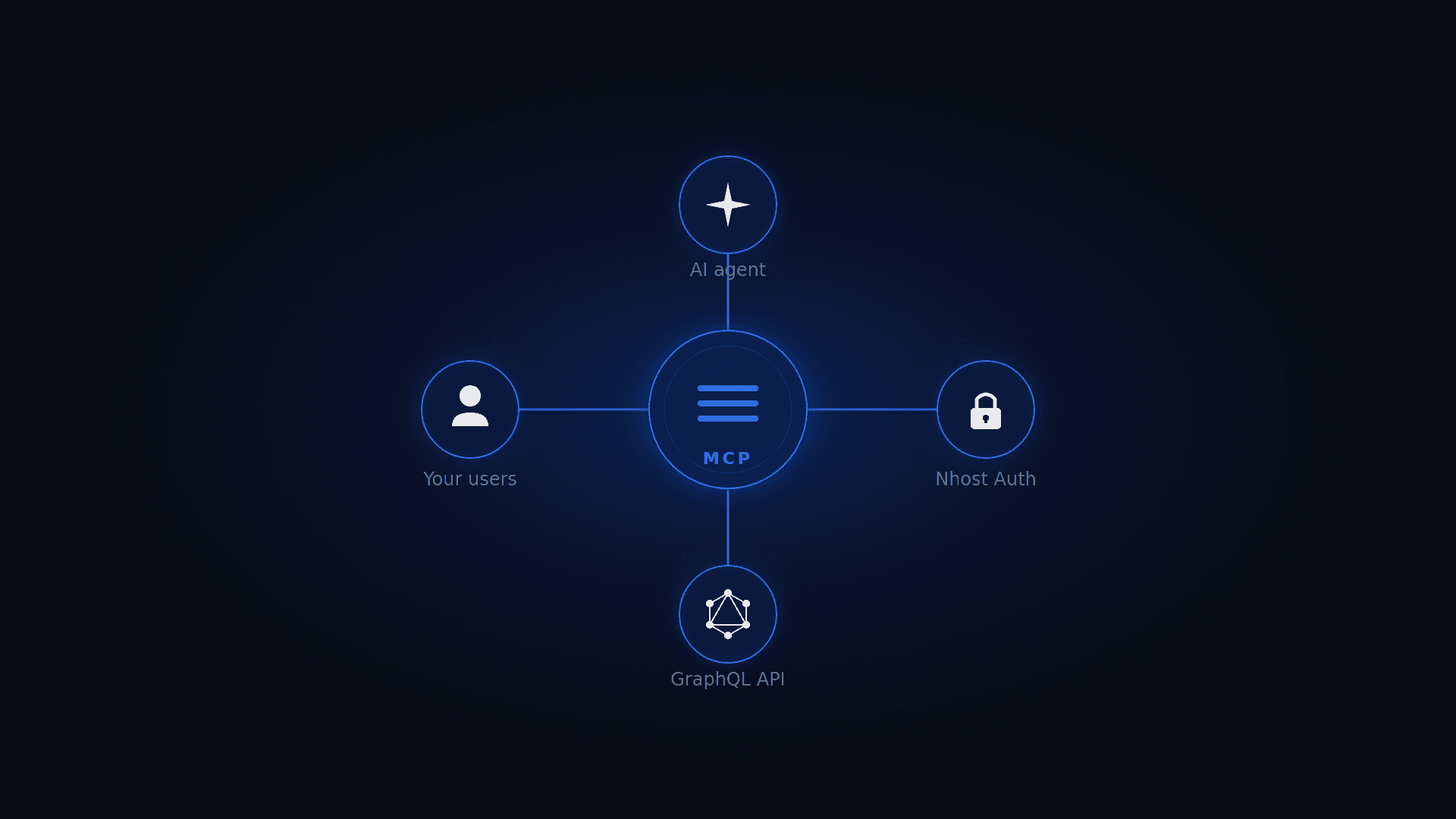
AI agents are becoming the new interface layer for applications. Instead of navigating dashboards and forms, users increasingly want to interact with their data through natural language. Today we're releasing an open-source service that lets you turn any Nhost project into an agentic service in just a few clicks.
The Nhost MCP Service
The Nhost MCP service is an open-source Go service that exposes your project's GraphQL API through the Model Context Protocol (MCP). MCP is an open standard that allows AI assistants like Claude, Cursor, or any compatible client to connect to external services and data sources.
Deploy it alongside your Nhost project and any MCP-compatible AI assistant can authenticate on behalf of your users via your existing Nhost Auth setup and interact with your data within the permissions you've defined. No custom integration code required.
How it works
The MCP server sits between the AI assistant and your project's GraphQL API and exposes three tools:
get-schema— Returns a summary of your GraphQL schema or the full SDL for specific queries/mutations, giving the AI assistant context about your data model.graphql-query— Executes read-only GraphQL queries against your project.graphql-mutation— Executes GraphQL mutations to create, update, or delete data.
The AI assistant discovers these tools automatically through the MCP protocol, understands your data model from the schema, and can then query and mutate data on behalf of the authenticated user.
Authentication and permissions
The service integrates with Nhost Auth as an OAuth2 authorization server, following the MCP Authorization specification. The flow is:
- The MCP client discovers auth requirements via
/.well-known/oauth-protected-resource. - The user is redirected to your Nhost Auth authorization endpoint (authorization code flow with PKCE).
- After login, the client exchanges the authorization code for a JWT access token.
- All MCP requests include the JWT as a Bearer token.
- The MCP server validates the JWT via JWKS and forwards it on every GraphQL request.
- The GraphQL service enforces row-level and column-level permissions based on the JWT claims.
This means the AI assistant can only access data the authenticated user is allowed to see — your existing permission model applies as-is.
You can further restrict access with the --enforce-role flag. For example, setting --enforce-role=user_mcp means only tokens issued with user_mcp as the default role will be accepted. This lets you create a dedicated role with limited permissions specifically for AI access — read-only on certain tables, restricted columns, whatever fits your use case.
Reference implementation: mcp.nhost.io
To demonstrate what this looks like in practice, we've deployed the MCP service on our own Nhost platform at https://mcp.nhost.io. This instance uses the user_mcp role to provide read-only access to our customers' project data and demonstrates how you can leverage MCP for agentic purposes.
Adding the connector
In Claude, go to Customize > Connectors, click the + button, give it a name (e.g. "Nhost cloud") and enter https://mcp.nhost.io as the URL:
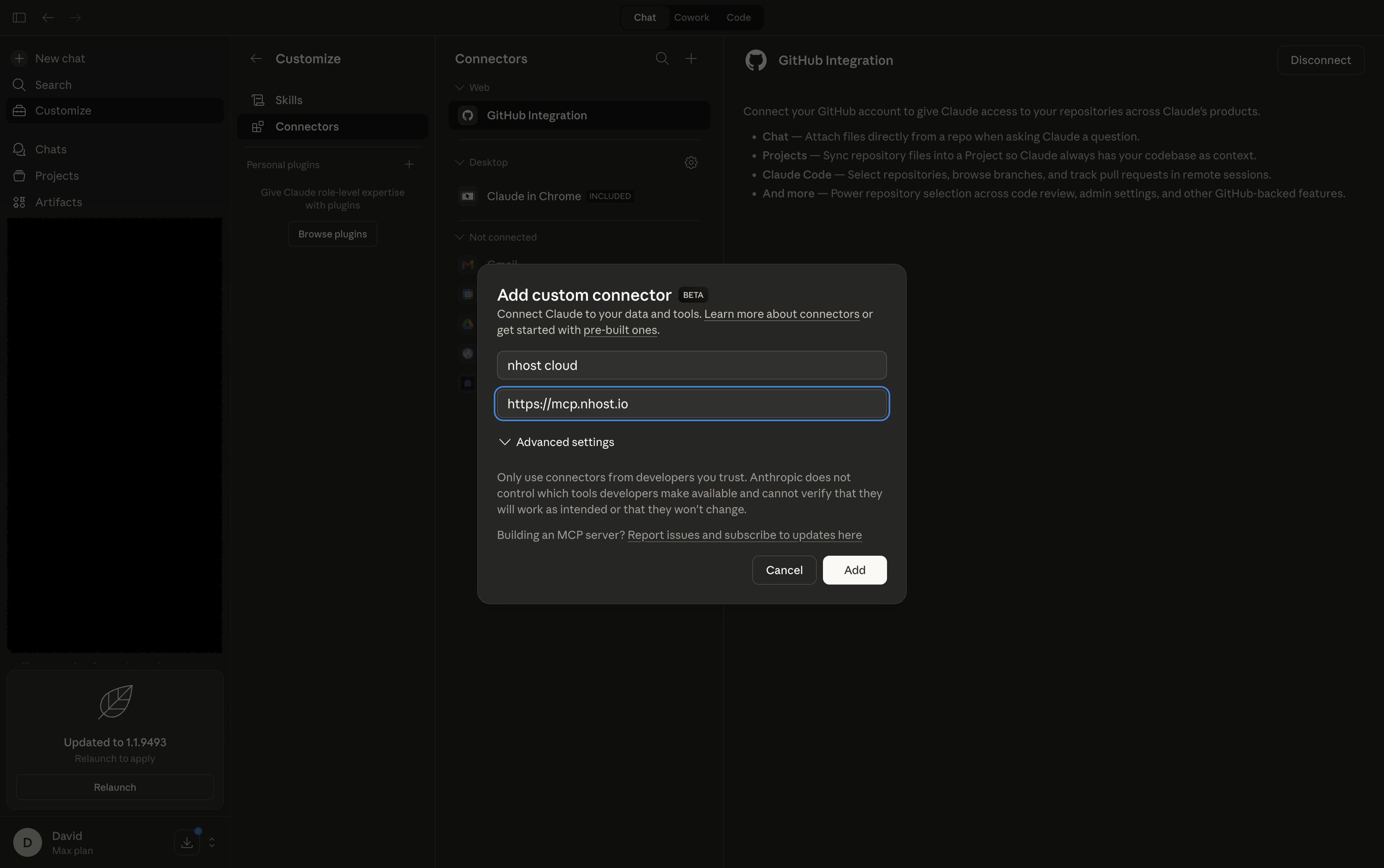 Adding the Nhost MCP connector in Claude
Authorizing via OAuth2
After clicking Add, you'll be redirected to the Nhost OAuth2 consent page. Here you can see the client ID, redirect URI, and the scopes being requested — in this case openid, graphql:role:user_mcp, and offline_access:
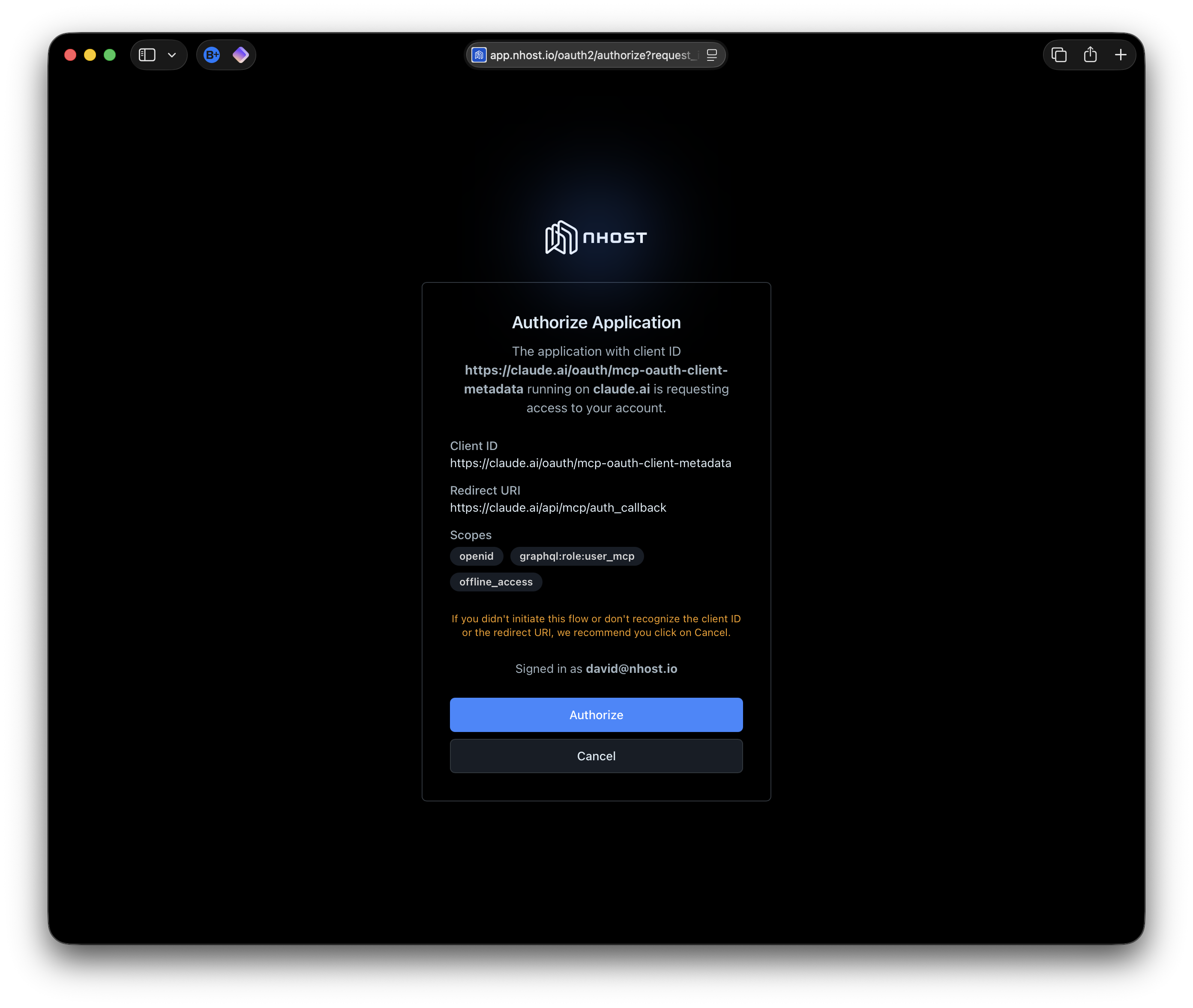 Nhost OAuth2 consent page showing authorization details
Click Authorize to grant access. The MCP client handles the rest of the OAuth2 flow automatically.
Using it
Once connected, the AI assistant has context about the Nhost platform's data model and can query it on your behalf. For example, you can ask questions about your projects and deployments in natural language:
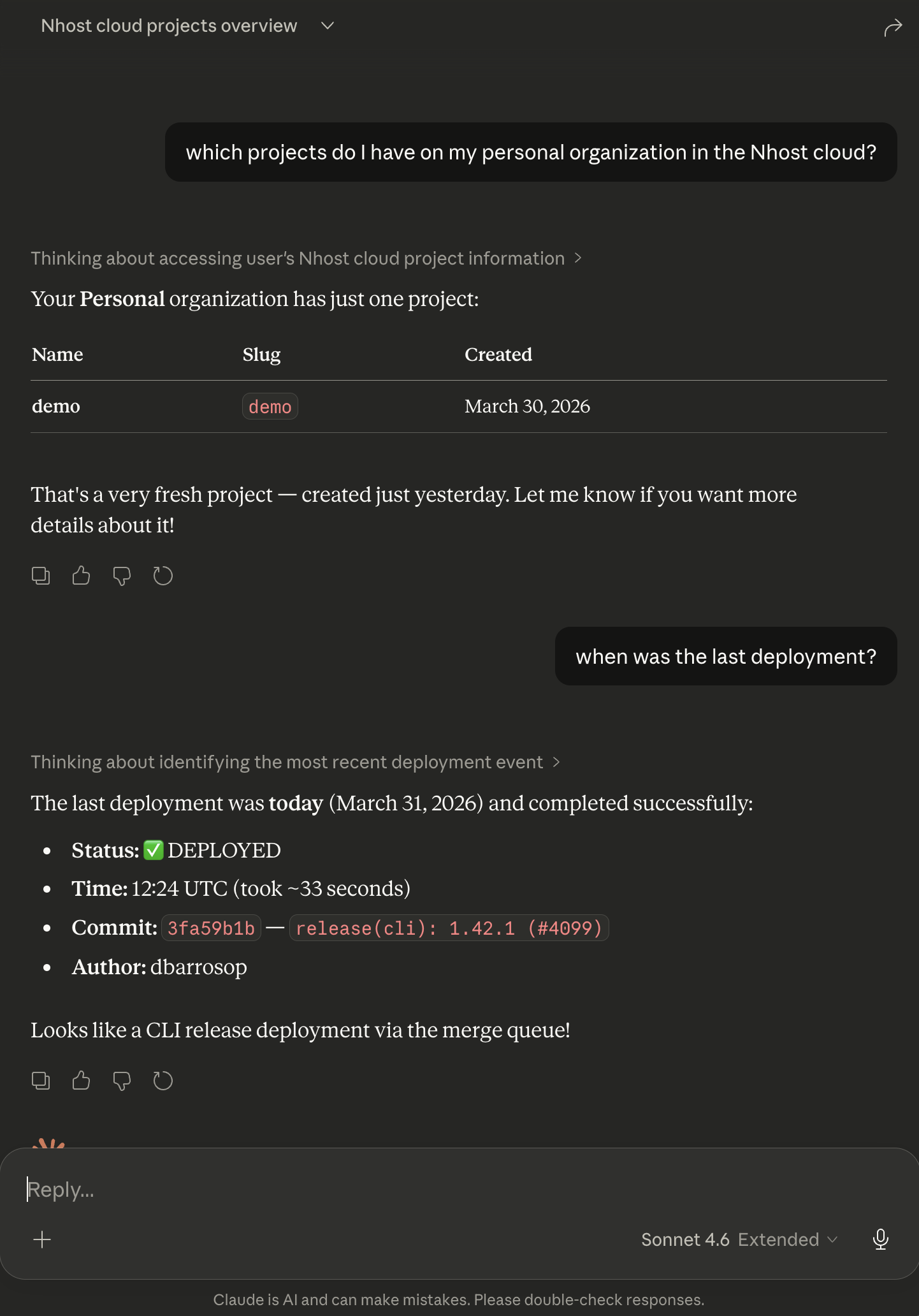 Claude querying Nhost project data via MCP
In this example, Claude lists the user's projects and retrieves deployment details — all through the MCP service, all respecting the user_mcp role permissions. We will keep iterating on the permissions to provide more functionality over time.
Deploy your own in minutes
Getting your own MCP service up and running takes just a few steps.
1. Enable OAuth2 and CIMD
The MCP service relies on Nhost Auth's OAuth2 provider capabilities. You'll need to enable OAuth2 and CIMD (Client Identity Metadata Document) so that MCP clients can dynamically register themselves.
2. Build a consent page
OAuth2 requires a consent page where users authorize the MCP client to access their data. You'll need to build this page as part of your application's authentication flow. See the consent page documentation for details.
3. Deploy the MCP service
The fastest way is through the one-click install link:
Deploy MCP to Nhost RunAfter clicking the link, edit the environment variables to match your project:
MCP_AUTH_URL— Set your project's subdomain and region (e.g.https://mysubdomain.auth.eu-central-1.nhost.run/v1)MCP_REALM— The public URL where your MCP service will be accessibleMCP_INSTRUCTIONS— Custom instructions to help the AI assistant understand your applicationMCP_ENFORCE_ROLE— The role to enforce (e.g.user_mcp), or remove it to allow any role
Alternatively, add a run-mcp.toml file to your project:
_37name = 'mcp'_37command = ['mcp']_37_37[image]_37image = 'nhost/mcp:0.0.8'_37_37[[environment]]_37name = 'MCP_AUTH_URL'_37value = 'https://SUBDOMAIN.auth.REGION.nhost.run/v1'_37_37[[environment]]_37name = 'MCP_REALM'_37value = 'https://mcp.acme.com'_37_37[[environment]]_37name = 'MCP_GRAPHQL_ENDPOINT'_37value = 'http://hasura-service:8080/v1/graphql'_37_37[[environment]]_37name = 'MCP_INSTRUCTIONS'_37value = 'This MCP server interacts with my application'_37_37[[environment]]_37name = 'MCP_ENFORCE_ROLE'_37value = 'user_mcp'_37_37[[ports]]_37port = 3000_37type = 'http'_37publish = true_37_37[resources]_37replicas = 1_37_37[resources.compute]_37cpu = 125_37memory = 256
Then deploy with:
_10nhost run config-deploy \_10 --config run-mcp.toml \_10 --service-id $SERVICE_ID
or run locally with:
_10nhost up --run-service run-mcp.toml
That's it. Your MCP service is live and any MCP-compatible client can connect to it.
What's next
This is our first iteration and we'd love your feedback. Both the open-source MCP service and our own reference implementation at mcp.nhost.io will evolve based on what we hear from you. Some things we're thinking about:
- Allowing you to configure which projects are accessible to LLMs and which ones aren't
- Expanding the permissions on our reference implementation beyond read-only access
- Adding more tools and capabilities to the MCP service
- Allowing you to enable/disable the service via a setting on your
nhost.tomlwithout needing a dedicated Run service.
The MCP service is fully open source — check out the source code, open issues, or submit PRs. If you have questions or feedback, reach out to us on Discord or GitHub.
Share this post


